Turn Your Mac Trackpad into a Pressure-Sensitive Drawing Tablet with SonarPen (USB C)

SonarPen (USB C) on Mac
Upgrade your Mac trackpad to a pressure sensitive drawing tablet
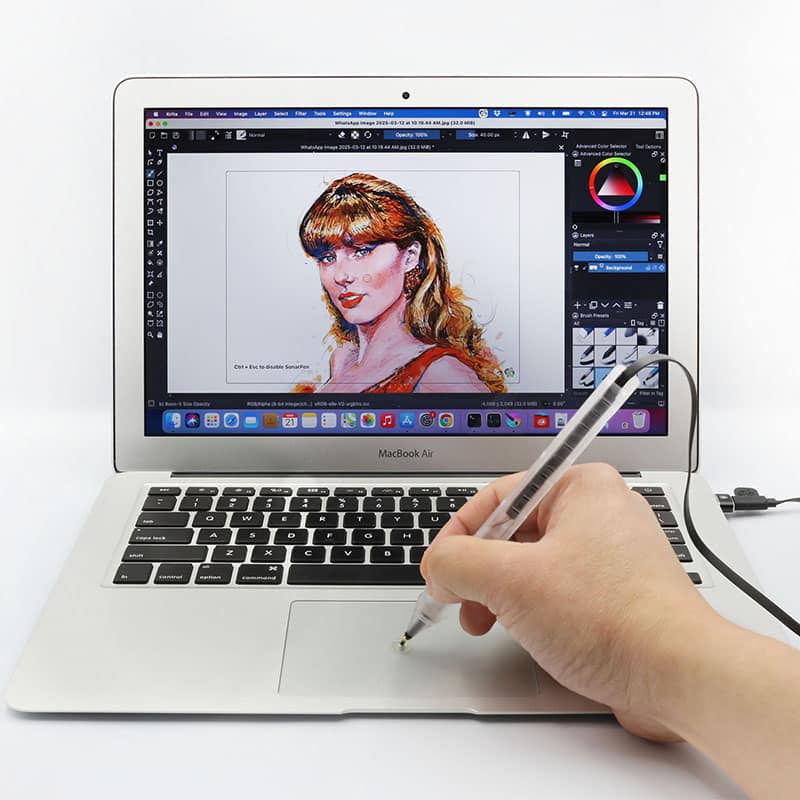
SonarPen (USB C) on Mac
Upgrade your Mac trackpad to a pressure sensitive drawing tablet
See how to use SonarPen (USB C) to draw on Mac
SonarPen (USB C) in action
See how to use SonarPen (USB C) to draw on Mac
SonarPen (USB C) in action
 SonarPen (USB C) US$ 43
|
VS. |
Drawing tablet
US$ 100+ |
|---|---|---|
| iPad, iPhone Android Touchscreen Chromebook Nintendo Switch Windows notebook or tablet & Mac |
Hardware compatibility |
some models compatible with more devices, some models less |
| USB C | Connection | USB A |
| 18 grams built-in cable management bundles with pen holder | Mobility | 300+ grams no cable management carry separately |
| Yes | Pressure sensitivity | Yes |
| Yes | Shortcut button | Yes |
| Virtual hovering on trackpad | Drawing cursor positioning | Hovering on tablet |
| just your Mac's trackpad | Space required | big desktop |
| Yes | Play music on Mac while drawing | Yes |
| Fine tip with transparent disc | Pen nib | Fine tip |
SonarPen vs.
Drawing Tablet
Drawing Tablet
SonarPen |
Drawing tabletUSD 100+ |
|
|---|---|---|
| Hardware compatibility | iPad, iPhone Android Touchscreen Chromebook Nintendo Switch Windows notebook or tablet & Mac computer |
some models compatible with more devices, some models less |
| Connection | USB C | USB A |
| Mobility | 18 grams built-in cable management bundles with pen holder |
300+ grams no cable management carry separately |
| Pressure | Yes | Yes |
| Button | Yes | Yes |
| Drawing cursor positioning | Virtual hovering on trackpad |
Hovering on tablet |
| Space required | just your Mac trackpad | big desktop |
| Play music on Mac while drawing | Yes, Apple Music, Spotify, YouTube supported |
Yes, Apple Music, Spotify, YouTube supported |
| Pen nib | Fine tip with transparent disc | Fine tip |











Tested and compatible with these creative apps out of the box.
Tested and compatible with all these creative apps out of the box.
Don't wait.
Pick up your SonarPen (USB C) and draw on your Mac now.
Requirements
◽️ SonarPen (USB C) stylus / SonarPen stylus with SonarPen USB Type C adapter
**USB adapters from other brands are not compatible.
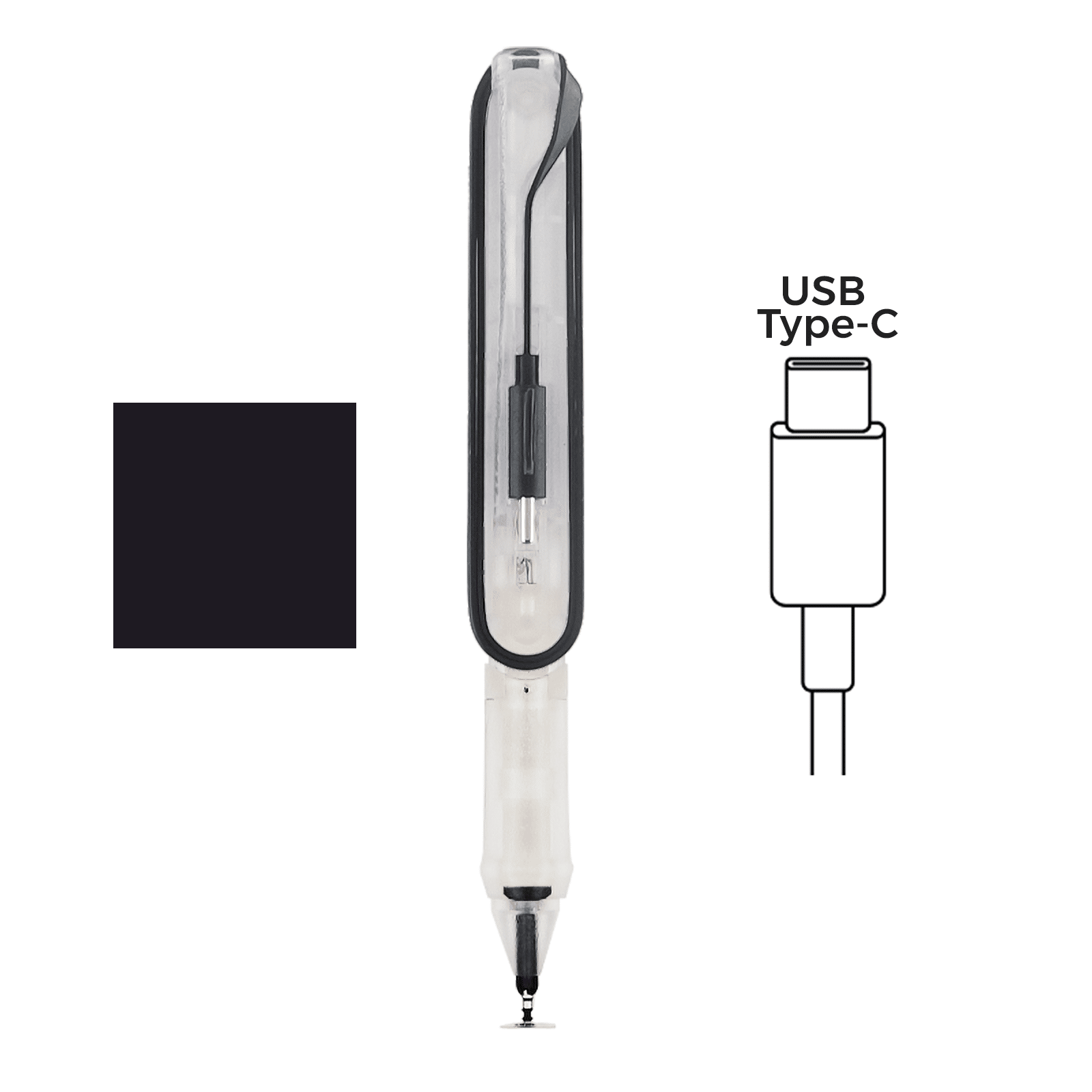 | or | 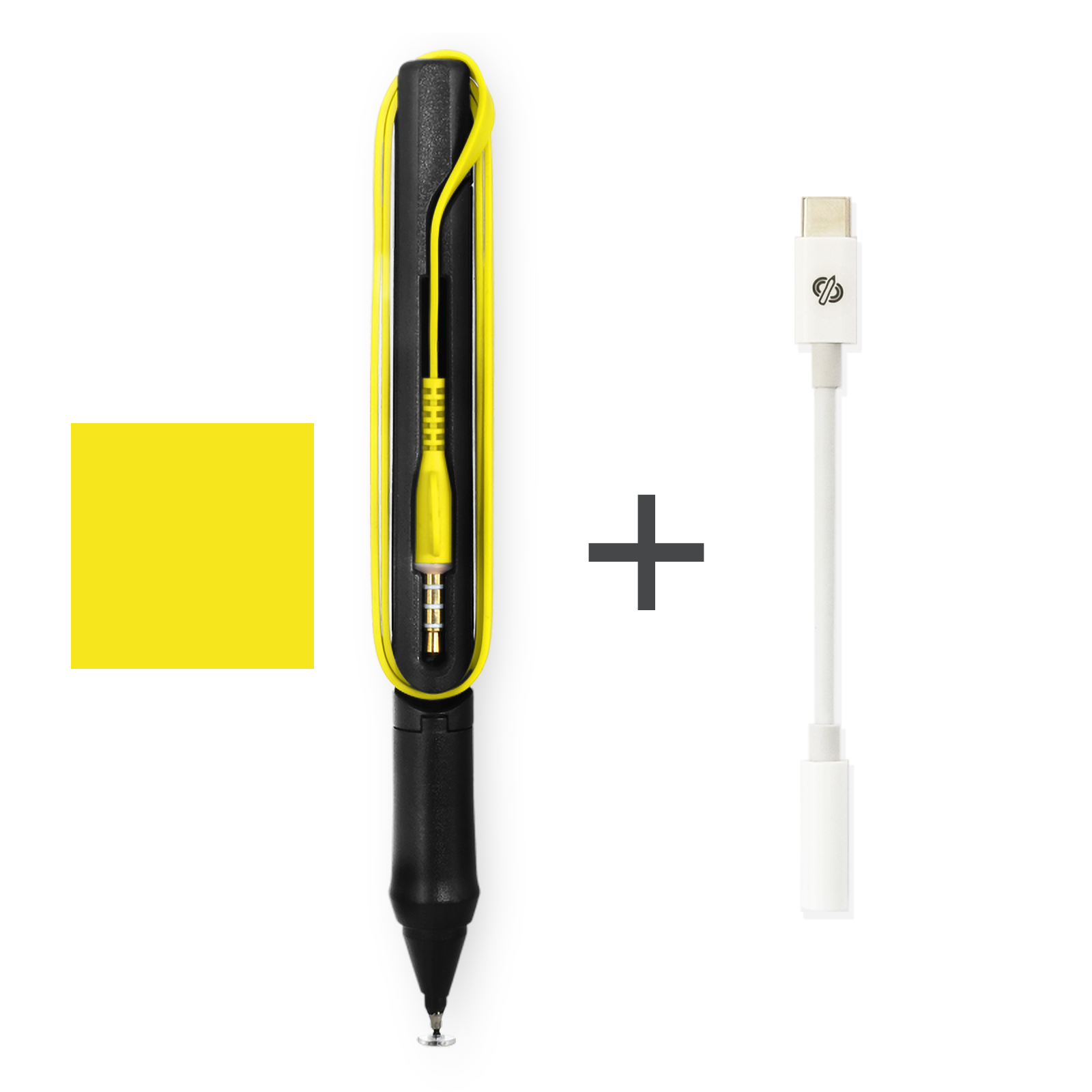 |
|---|
◽️ SonarPen macOS driver
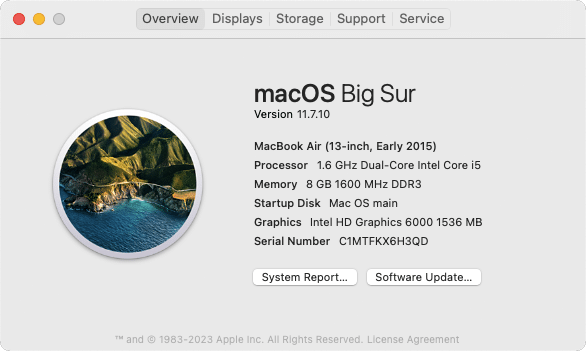
◽ Mac computer (desktop or notebook) running macOS 12 or newer
Click > About This Mac to find out the version of the installed macOS.
 |
|---|
◽️ Internal or External trackpad connected to the Mac
◽️ Drawing apps that support stylus input, like Photoshop, Krita
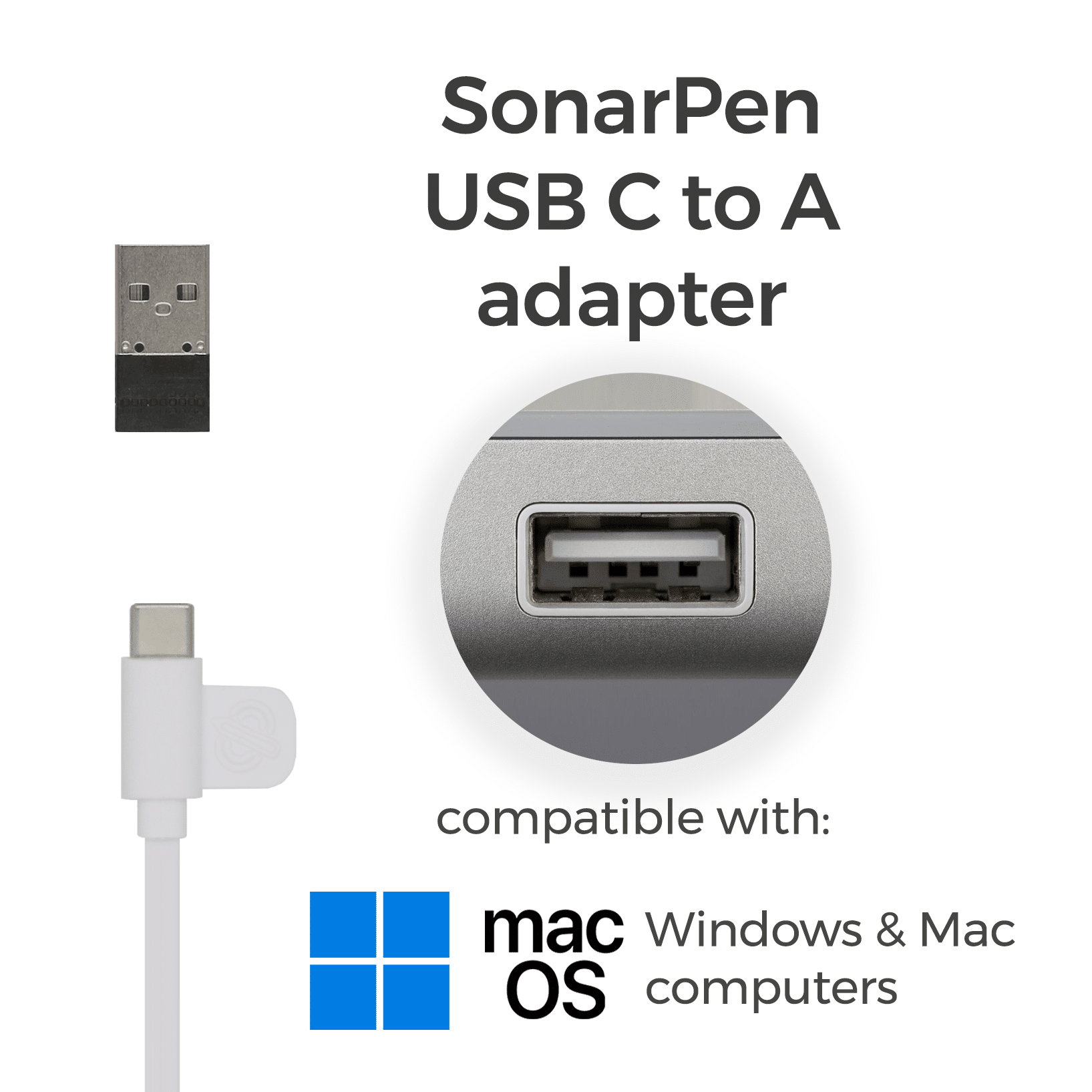
◽ SonarPen USB Type-C to A adapter
**optional, for computer without USB C port
 |
|---|
Requirements
◽️ SonarPen (USB C) stylus / SonarPen stylus with SonarPen USB Type C adapter
**USB adapters from other brands are not compatible.
| or | |
|---|
◽️ SonarPen macOS driver
◽️ Mac computer (desktop or notebook) running macOS 12 or newer
Click > About This Mac to find out the version of the installed macOS.
◽️ Internal or External trackpad connected to the Mac
◽️ Drawing apps that support stylus input, like Photoshop, Krita
◽ SonarPen USB Type-C to A adapter
**optional, for computer without USB C port
|
|---|
The SonarPen macOS Driver detects your strokes on the trackpad and sends them to the drawing app.
It is FREE for all SonarPen users!
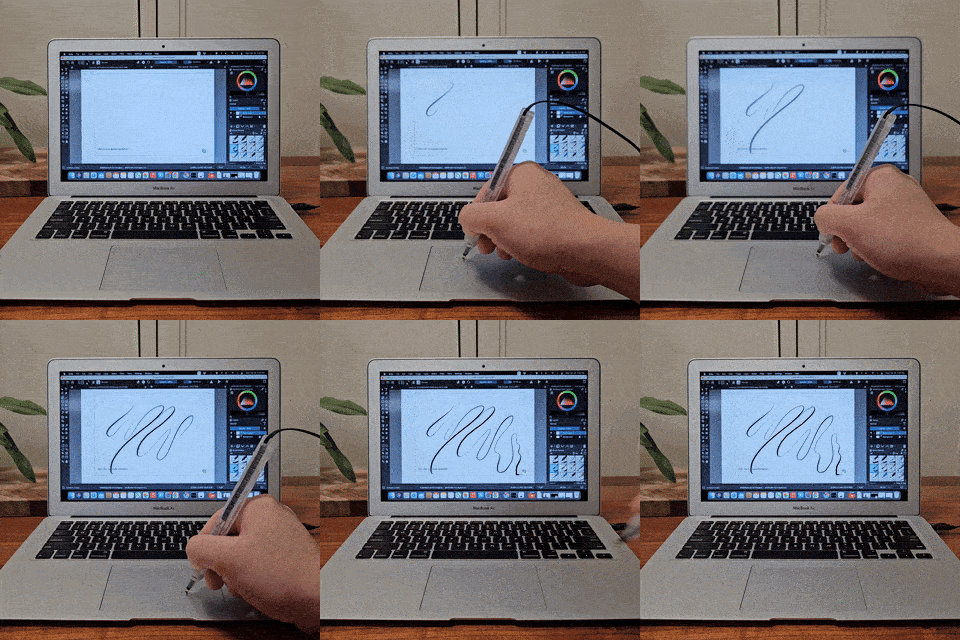
SonarPen macOS Driver detects your strokes on the trackpad and send them to the drawing app.
It is FREE for all SonarPen users!
Download SonarPen macOS Driver
V2.0, released in 30 Oct 2026
for all Mac computers with internal or external trackpad
with macOS 12 or newer
[v2.0]
- Play Audio While Drawing, SonarPen no longer block audio on Mac. Listen to music, podcast on speaker while drawing with SonarPen.
- Virtual Hover, An improved way to move the cursor without drawing, with adjustable pressure sensitivity and a special cursor so you can easily see when Virtual Hover is active.
-New Pressure Sensitivity Options, Added W Brand and Proportional pressure curves, alongside Low, Medium, and High.
-Enhanced Trackpad Gesture Controls, Improved customization of System and Drawing gesture areas.
-Updated macOS requirement, Supports macOS 12 or later on Intel and Apple Silicon Macs.
- Improve compatibility with macOS 26 and 27
- Improved Stability, The SonarPen macOS driver no longer needs a separate helper app to run, making it simpler to install and more reliable.
[ v1.8.3 ]
- Improve compatibility with macOS 26 Tahoe
[ v1.8.2 ]
- Bug fixed for MacBook with touchbar
[ v1.8 ]
- Added palm rejecting area on the button edge of the trackpad
- Fix a freezing bug when opening the settings menu while external Magic Trackpad connected
[ v1.5.1 ]
- Fix compatibility problem with MacBook with Touch Bar
- MacBook Pro 2016
- MacBook Pro 15-inch (2016)
- MacBook Pro 16-inch (2019)
- MacBook M2 Air (2022)
- MacBook Pro M2 (LATE 2023)
[ v1.5.0 ]
- Improved installation process to ensure SonarPen driver has all the necessary permissions to operate
- Improved app compatibility so SonarPen works with more creative apps
- Added Compatible Mode for apps like SketchBook Pro that don't detect pressure sensitivity normally
- Added ability to use external Magic Trackpad
- Trackpad split into left and right halves, allowing two-finger gestures (move, zoom, rotate) to control the SonarPen drawing window and other on-screen elements separately
- Added Reset driver switch in the settings panel for a fresh restart
[ v1.0.0 Initial release ]
- Pressure sensitivity
- User customizable shortcut button
- Pressure sensitive level adjustment
- Pressure smoothness level adjustment
- Tap the table gesture allows switching between drawing and finger gesture mode easily.
V1.8.3, released in 15 Jun 2025
for all Mac computers with internal or external trackpad
with macOS 11 or newer
|
Step by step tutorial to install SonarPen macOS driver
Download SonarPen macOS Driver
V2.0, released in 30 Oct 2026
for all Mac computers with internal or external trackpad
with macOS 12 or newer
[v2.0]
- Play Audio While Drawing, SonarPen no longer block audio on Mac. Listen to music, podcast on speaker while drawing with SonarPen.
- Virtual Hover, An improved way to move the cursor without drawing, with adjustable pressure sensitivity and a special cursor so you can easily see when Virtual Hover is active.
-New Pressure Sensitivity Options, Added W Brand and Proportional pressure curves, alongside Low, Medium, and High.
-Enhanced Trackpad Gesture Controls, Improved customization of System and Drawing gesture areas.
-Updated macOS requirement, Supports macOS 12 or later on Intel and Apple Silicon Macs.
- Improve compatibility with macOS 26 and 27
- Improved Stability, The SonarPen macOS driver no longer needs a separate helper app to run, making it simpler to install and more reliable.
[ v1.8.3 ]
- Improve compatibility with macOS 26 Tahoe
[ v1.8.2 ]
- Bug fixed for MacBook with touchbar
[ v1.8 ]
- Added palm rejecting area on the button edge of the trackpad
- Fix a freezing bug when opening the settings menu while external Magic Trackpad connected
[ v1.5.1 ]
- Fix compatibility problem with MacBook with Touch Bar
- MacBook Pro 2016
- MacBook Pro 15-inch (2016)
- MacBook Pro 16-inch (2019)
- MacBook M2 Air (2022)
- MacBook Pro M2 (LATE 2023)
[ v1.5.0 ]
- Improved installation process to ensure SonarPen driver has all the necessary permissions to operate
- Improved app compatibility so SonarPen works with more creative apps
- Added Compatible Mode for apps like SketchBook Pro that don't detect pressure sensitivity normally
- Added ability to use external Magic Trackpad
- Trackpad split into left and right halves, allowing two-finger gestures (move, zoom, rotate) to control the SonarPen drawing window and other on-screen elements separately
- Added Reset driver switch in the settings panel for a fresh restart
[ v1.0.0 Initial release ]
- Pressure sensitivity
- User customizable shortcut button
- Pressure sensitive level adjustment
- Pressure smoothness level adjustment
- Tap the table gesture allows switching between drawing and finger gesture mode easily.
V1.8.3, released in 15 Jun 2025
for all Mac computers with internal or external trackpad
with macOS 11 or newer
Step by step tutorial to install SonarPen macOS driver
missing the SonarPen USB Type-C adapter?
Optimize SonarPen to work on your Mac
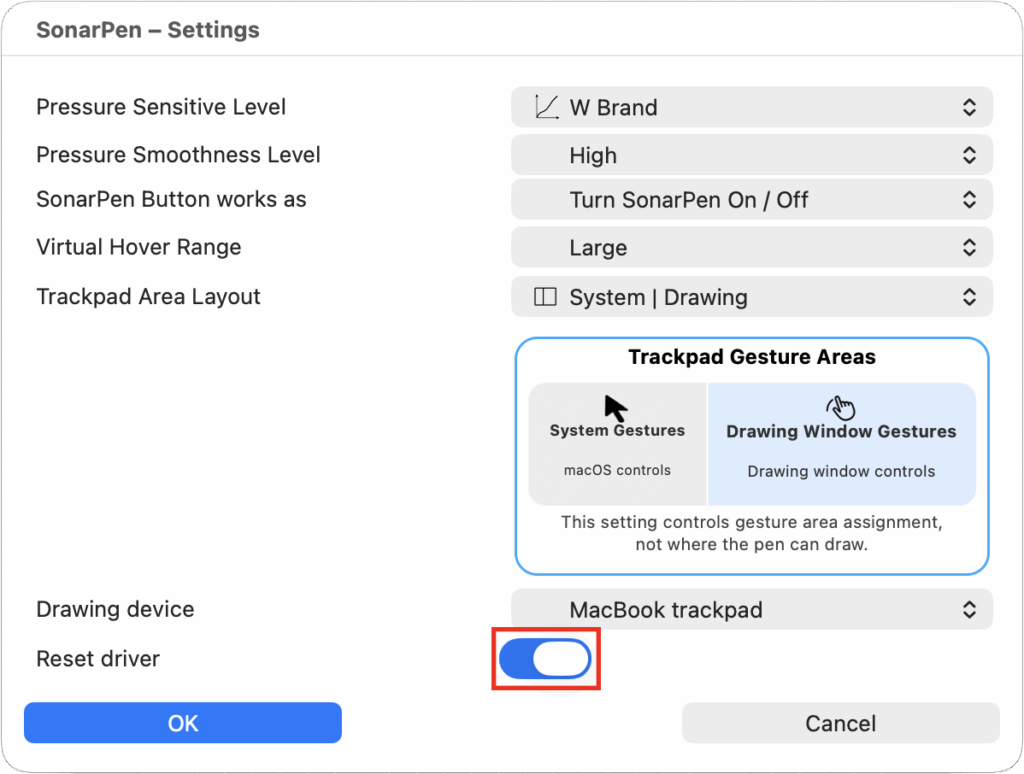
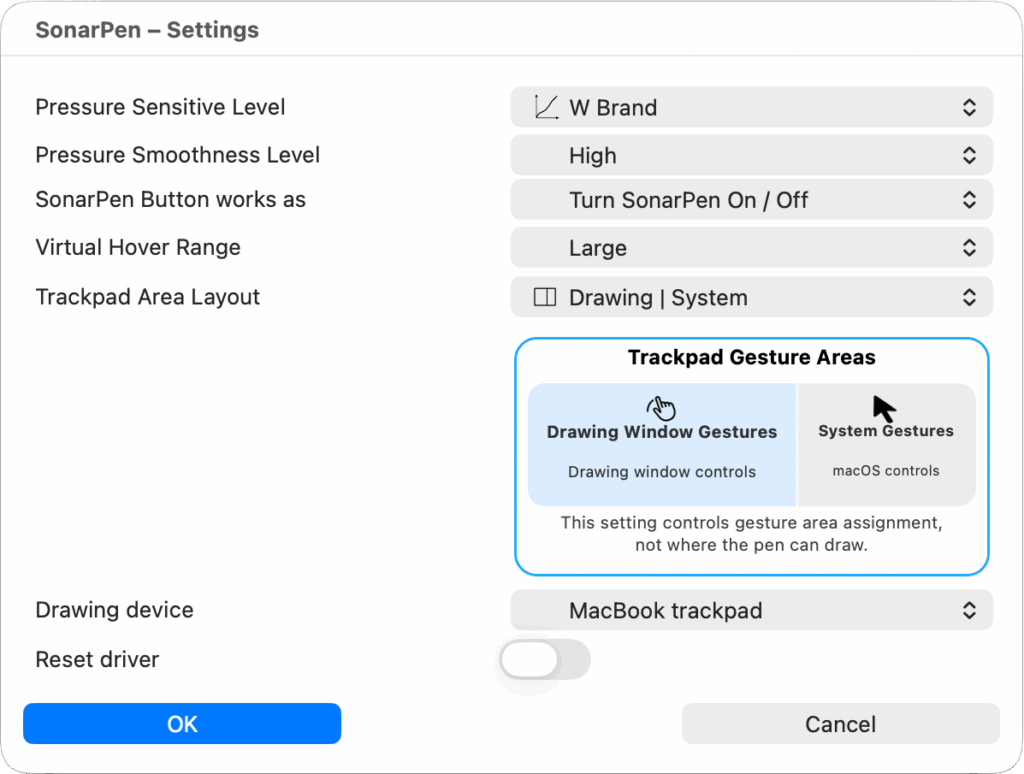
SonarPen driver works immediately after calibration. However, here are a few settings to make the SonarPen work closer to your drawing habit.
Customize touch device, button and pressure behavior with Settings menu
Pressure Sensitive: Choose from W Brand (default), Proportional, Low, Medium, or High. This controls how hard you need to press SonarPen to draw thicker or thinner lines.
Pressure Smoothness: Choose Low, Medium, or High to control how smoothly SonarPen responds to changes in pressure while drawing.
SonarPen Button:
- Undo: Undo your last action, just like pressing Command + Z (⌘Z).
- Barrel Button: Use the button for special functions supported by your drawing app.
- Turn SonarPen On/Off: Quickly switch between drawing with SonarPen and using your trackpad normally.
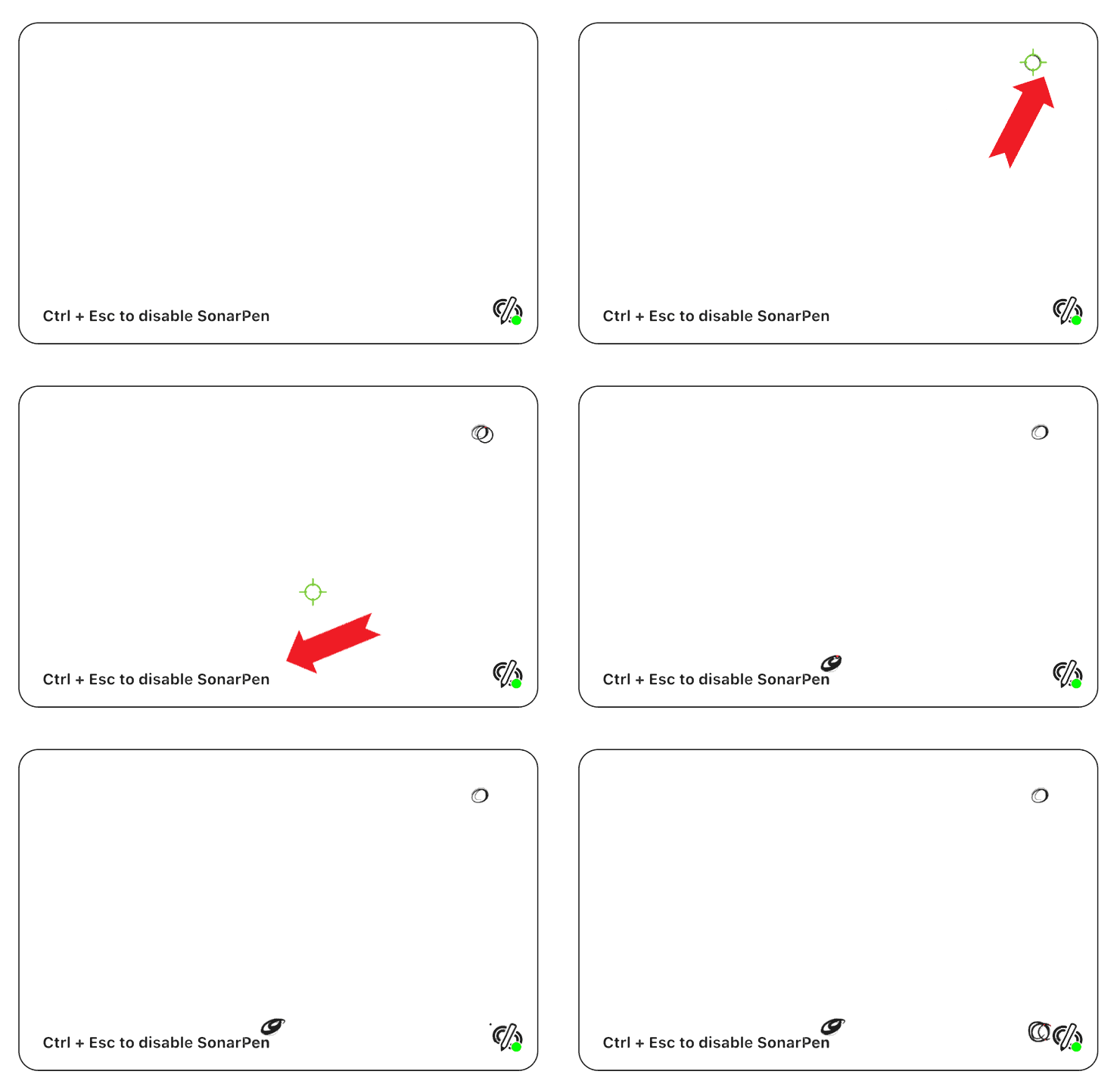
Virtual Hover
Lightly touch the trackpad with SonarPen to move the cursor on the screen without drawing. Press a little harder to start drawing. A special green hover cursor lets you know when Virtual Hover is active, and you can adjust its pressure sensitivity in the driver settings.
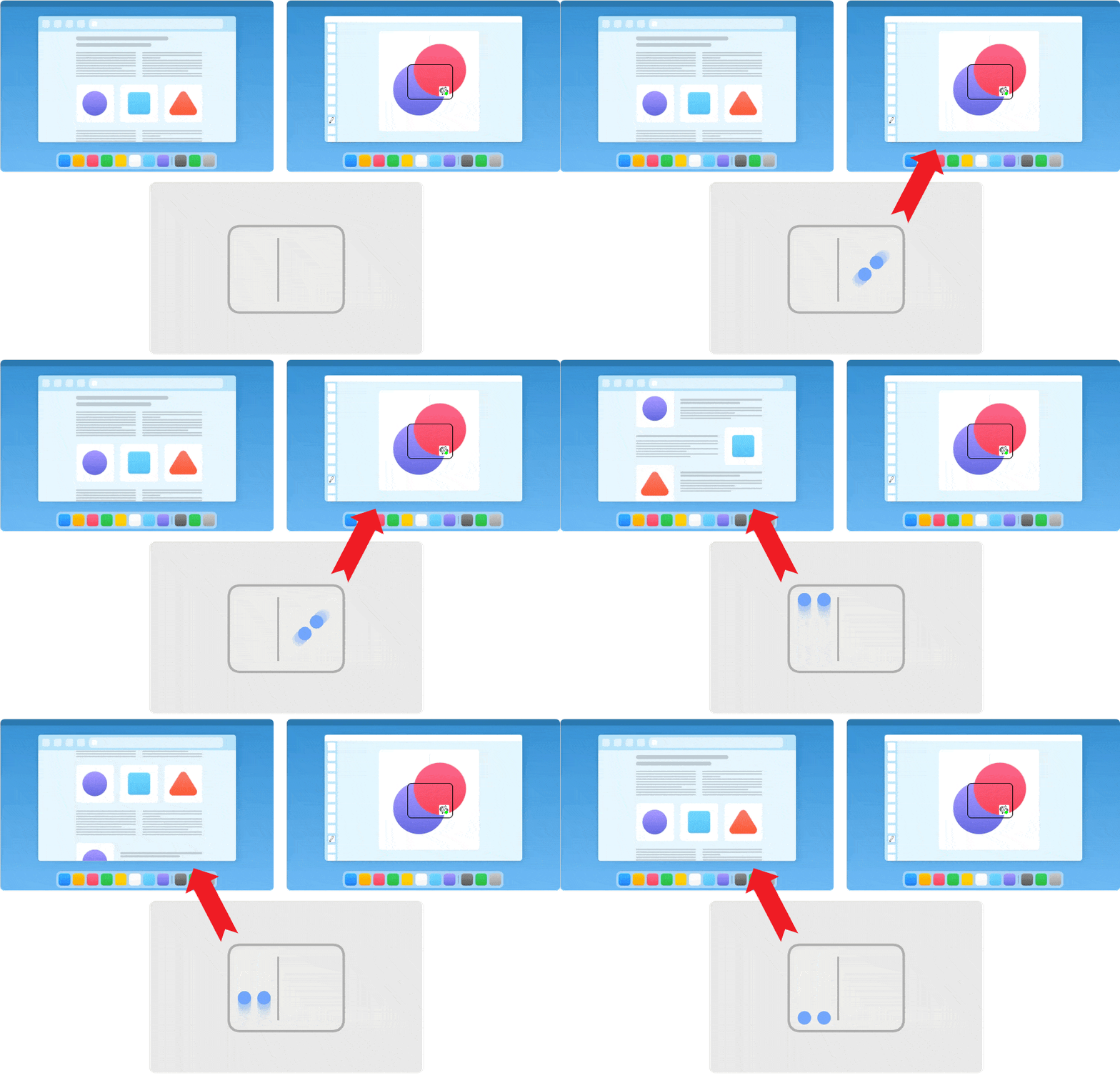
Using 1 and 2 Finger Trackpad Gestures
1 Finger: Use anywhere on the trackpad to move the mouse pointer and click, just like normal.
2 Fingers: By default, the trackpad is divided into two halves:
- Right half: Move, rotate, and zoom the SonarPen drawing window.
- Left half: Scroll, zoom, and control other content on your Mac.
You can change how the two halves work in the SonarPen Settings panel.
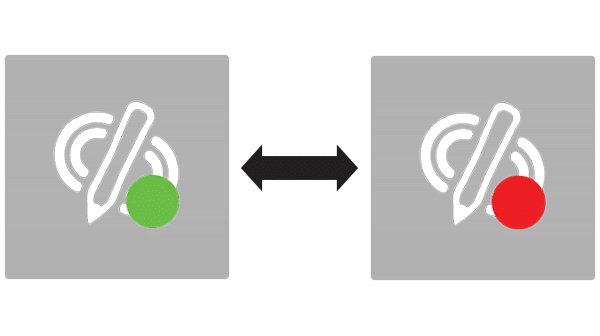
Turn SonarPen On or Off
You can quickly turn SonarPen on or off in three ways:
- SonarPen Button: Press the button on your SonarPen (if set to On/Off in Settings).
- Keyboard Shortcut: Press Control + Esc (⌃ Esc).
- Table Tap: Tap SonarPen on a table and hold it for 1 second.
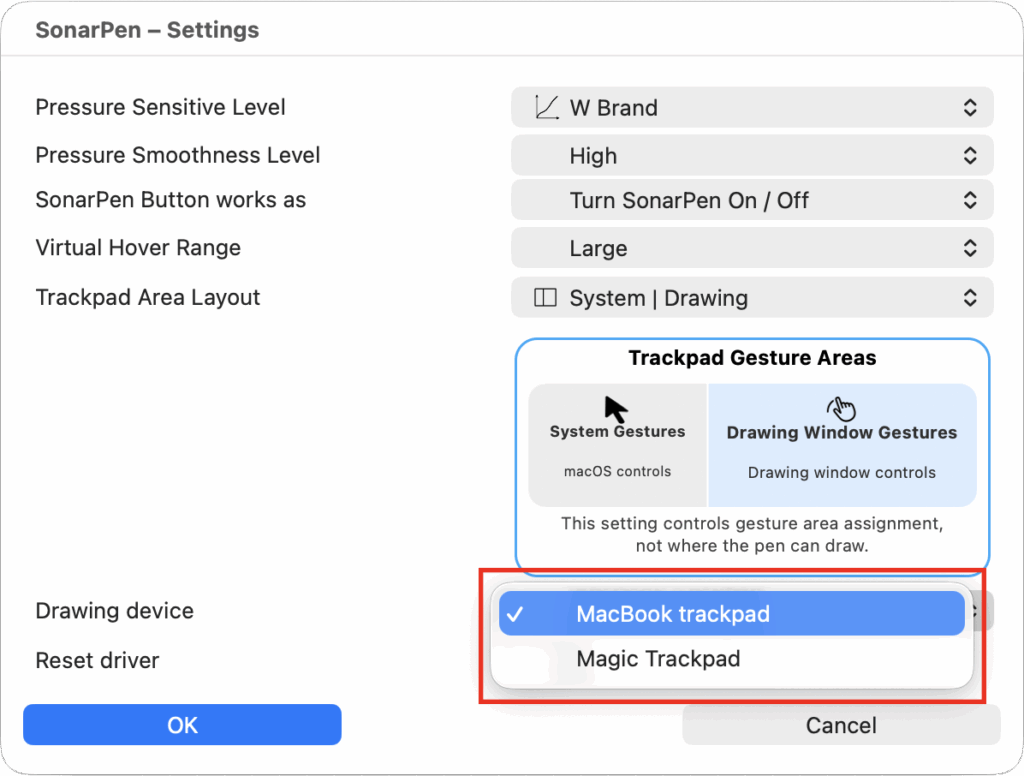
Switch Between Built-in and External Trackpads
If your Mac has more than one trackpad, you can choose which one to use with SonarPen in the SonarPen Settings panel.
Reset SonarPen to Factory Settings
If SonarPen isn't working properly, go to the SonarPen Settings panel, click Reset driver, and confirm by clicking OK. This will restore the default settings and clear your saved calibration.